🚀 arnold™ 1.0.0 Release​

arnold™ 1.0.0 marks a major milestone with Salesforce Agentforce support, expanded customization capabilities, stronger governance controls, and improved platform administration.

☁️ Salesforce Agentforce Support​

What it is​

The arnold MCP Server is now available for Salesforce Agentforce, enabling Agentforce agents to securely access SAP data and execute business workflows through arnold.

Why it matters​

  • Bring trusted SAP data directly into Salesforce Agentforce
  • Enable AI-powered sales and customer service workflows using live SAP data
  • Extend Agentforce with governed, enterprise-ready SAP integrations
  • Connect Salesforce and SAP without custom point-to-point integrations

🛠️ One-Click Custom Tool Creation​

What it is​

Convert any supported pre-built MCP tool into a custom tool with a single click. Existing tool definitions and configurations are automatically carried over, allowing you to quickly tailor arnold to your business needs.

Why it matters​

  • Accelerate custom tool development
  • Reduce manual configuration
  • Extend standard arnold capabilities with minimal effort

⚙️ Custom Tool Override Support​

What it is​

Custom tools can now replace the behavior of pre-built tools by using the same tool name, allowing organizations to customize standard arnold functionality without modifying the original implementation.

Why it matters​

  • Tailor arnold to your business processes
  • Replace standard behavior with custom logic
  • Simplify maintenance of customized solutions

🔒 Enhanced Tool Governance​

What it is​

Administrators can now classify custom tools using governance properties such as Read-only and Destructive. These classifications help AI hosts understand how tools should be executed and support safer automation.

Why it matters​

  • Improve governance and compliance
  • Reduce risk when exposing business operations to AI
  • Better align tools with enterprise security policies

📦 Improved Application Lifecycle Management​

What it is​

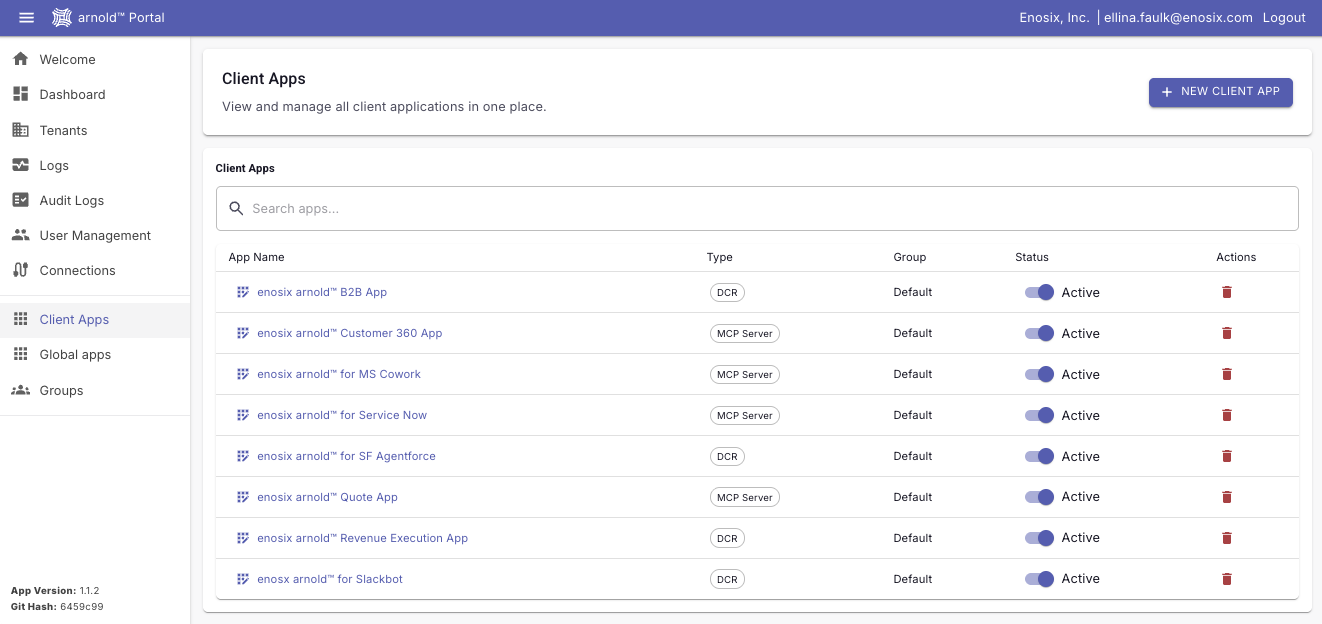
Client Apps can now be deleted directly from the arnold Portal, making it easier to manage outdated or unused configurations throughout the application lifecycle.

Why it matters​

  • Simplify environment administration
  • Reduce stale configurations
  • Improve long-term platform maintenance

🔍 Enhanced Logging & Diagnostics​

What it is​

Logs now provide richer diagnostic information with direct navigation to related Connections and Client Apps, making it easier to investigate requests and resolve issues.

Why it matters​

  • Faster troubleshooting
  • Easier navigation between related resources
  • Improved operational visibility

✨ Additional Improvements​

This release also includes enhancements across the arnold platform, including:

  • Improved Custom Tool Editor with visual parameter configuration and annotation support
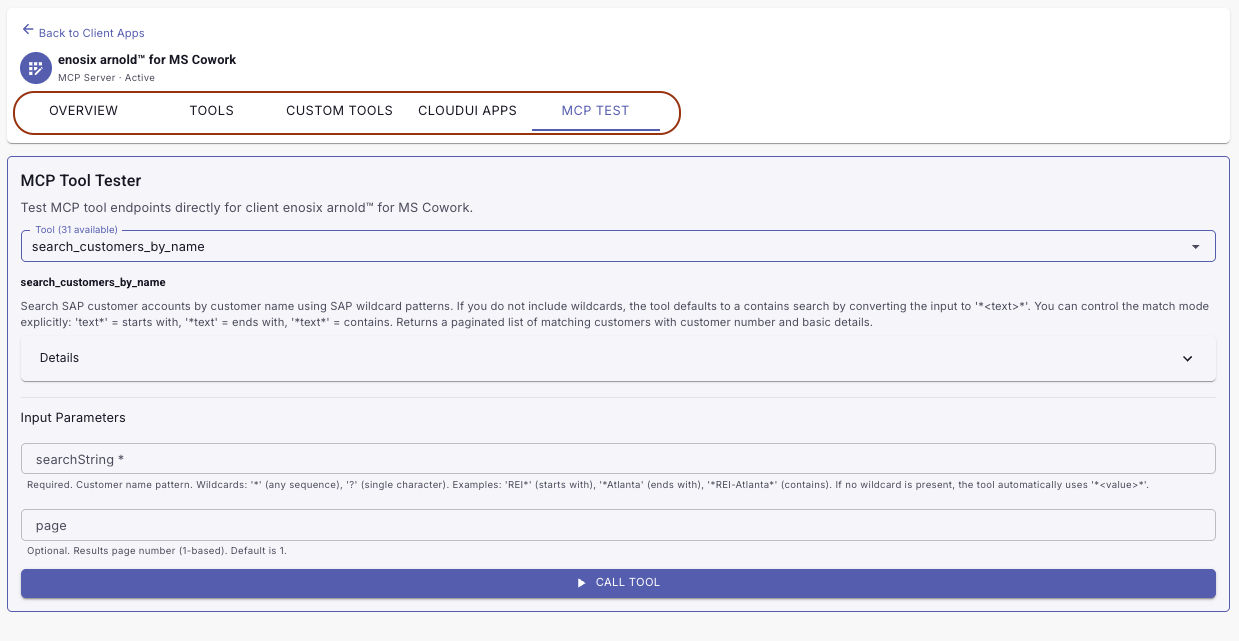
  • Enhanced MCP Tool Tester with expanded tool details
  • Improved user management with better search, filtering, and pagination
  • Updated impersonation workflow with configurable approval periods and approval email support
  • Enhanced log pagination and usability
  • Updated connection status indicators throughout the Portal
  • Improved authentication and credential handling for MCP tool execution
[Feature]: Hex dump of PDF download response

  • This release adds a feature that lets admins view a hex dump of the PDF download response when trace is enabled.

[Feature]: Brotli decompression support

  • This release adds a feature that supports Brotli Content-Encoding on responses from SAP.

[Bug Fix]: Delegated Authentication for Basic Auth

  • This release fixes a 401 error in the basic-auth destination auth-payload endpoint when the Authorization header was missing.

[Feature]: Enhanced PDF Download Logging

  • This release introduces the ability to view more detailed logs related to generating a PDF Download URL. These more detailed logs can be viewed by setting the Logging__LogLevel__enosix.Link.Handlers.DocumentDownloadHandler environment variable to Trace.

Enhancements​

  • Configurable pricing simulate API for VC-UI Added a new PricingSimulateApi AppSetting in VC-UI so pricing simulate requests can be routed to either the Opportunity Pricing API or the Sales Document simulate API. This makes it easier to test against SAP environments that expose pricing through different RIOs while preserving the existing Opportunity Pricing behavior by default.

Get it here: v9.6.35

🚀 Arnold™ 0.7.4 Release​

Arnold™ 0.7.4 introduces enhanced monitoring, more flexible custom tools, and improvements to OAuth authentication and Microsoft Copilot connectivity.

🔍 Enhanced Monitoring & Troubleshooting​

What it is​

Webhook logs now include Correlation IDs, making it easier to trace requests across arnold, external applications, and SAP.

Why it matters​

  • Trace requests across end-to-end workflows
  • Speed up troubleshooting
  • Improve operational visibility

⚡ More Flexible Custom Tools​

What it is​

Custom Jint tools can now use named connections, allowing a single custom tool to connect to different SAP systems other than the Client App.

Why it matters​

  • Support multi-system integrations
  • Build more flexible custom tools
  • Simplify complex integration scenarios

🔐 Improved Authentication & Copilot Connectivity​

What it is​

Improved OAuth and Dynamic Client Registration (DCR) with better re-authentication, XSUAA identity provider pre-selection, consent handling, and more reliable chat session initialization.

Why it matters​

  • Simpler Microsoft Copilot onboarding
  • Faster authentication setup
  • More reliable sign-in and connection flows

[Feature]: Swagger API Testing Security and Usability Improvements

  • This release introduces API testing using a principal propagation destination and OpenID Connect (OIDC) configured in Swagger API documentation.

  • Swagger now supports OAuth2 authorization. Users can authenticate in Swagger using the OpenID Connect flow.

Detailed documentation can be found here: Swagger UI

[Feature]: Swagger UI – APIs Secured with Multi-Authentication

  • This release introduces API testing with multiple authentication methods in the Swagger UI, with this feature completing API proxy authentication for all possible scenarios.

Detailed documentation can be found here: Swagger UI

[Feature]: Optional session-id header for session management

  • This release introduced an optional header parameter called session-id which will help manage the sessions better.

Additional details can be found in the session documentation.

Bug Fixes​

  • VC Session Recovery After Browser Back Navigation
    Fixed an issue in the Variant Configuration UI where navigating away with the browser back button could leave an orphaned SAP session. Returning to the configurator could then fail with a session-related error. The application now closes and recovers sessions correctly so VC can be reopened reliably.

Get it here: v9.6.29